












































A page's “Statistics” tab: custom periods, history, top links, blocks and widgets, breakdowns and how far back data goes on each plan.
Every page has its own “Statistics” tab in the page editor. It goes deeper than the dashboard: you choose any date range, see clicks per link and per block, and can break UTM parameters down as far as term and content. All roles can see the tab, including viewers.
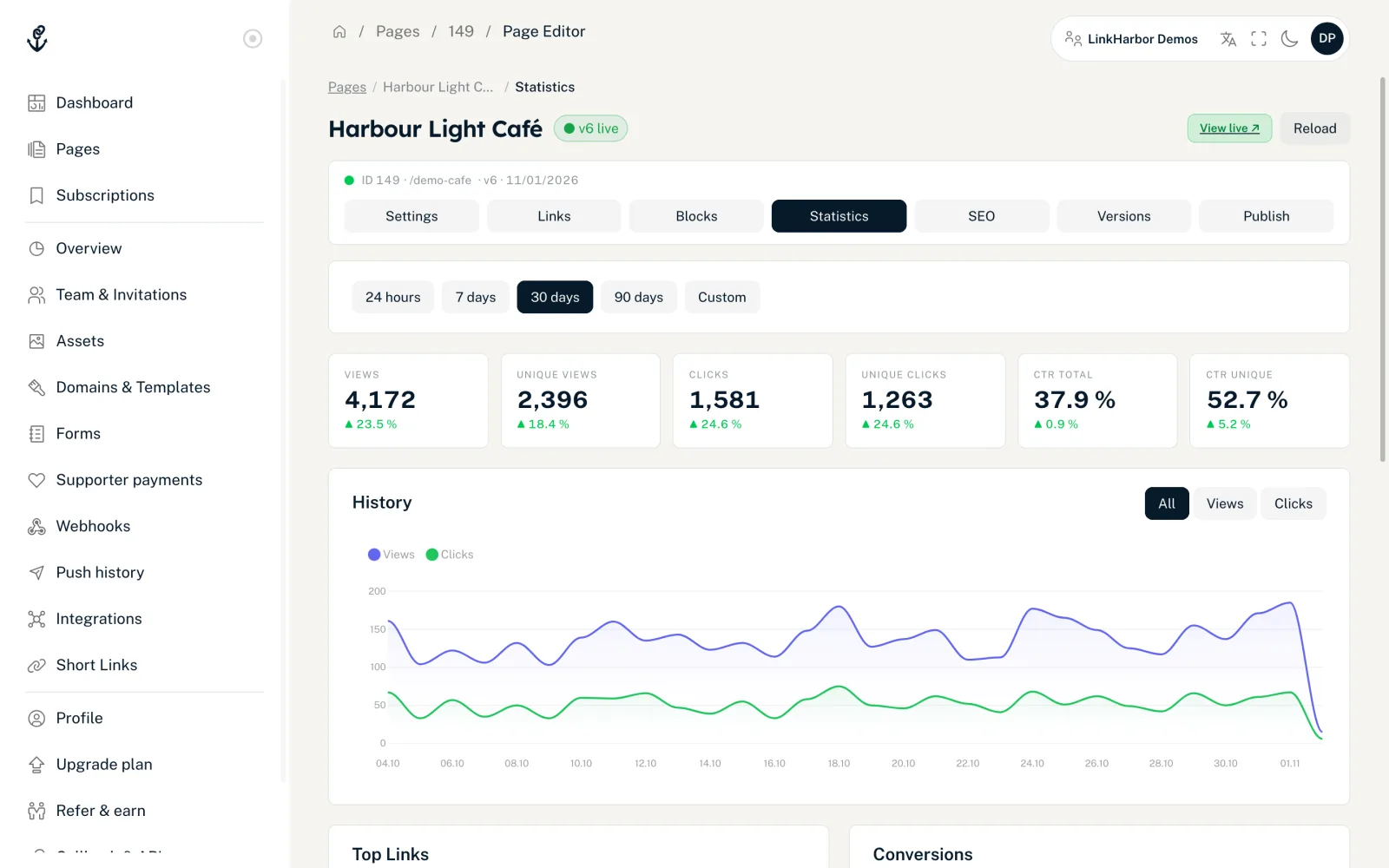
How to open the statistics
- Open “Pages” in the menu
- Click the page you want
- In the page editor, switch to the “Statistics” tab
Set the period
- “24 hours”, “7 days”, “30 days”, “90 days”
- Fixed periods up to now. The default is “30 days”.
- “Custom”
- Shows the “From” and “To” fields. You also choose the granularity “Hourly” or “Daily” and click “Load”.
Periods are calculated in UTC: “From” starts at 0:00 and “To” ends at 23:59:59 UTC. Depending on your time zone, the day boundaries therefore shift by a few hours.
Metrics
At the top are six tiles: Views, Unique Views, Clicks, Unique Clicks, CTR Total and CTR Unique. Each shows the change from the previous period of the same length, or “no comparison” if there is no value to compare with. The terms are described in Dashboard metrics explained.
The reports
- “History”
- A chart over the period, switchable between “All”, “Views” and “Clicks”.
- “Top Links”
- The 10 links with the most clicks, with the columns Clicks and Unique.
- “Blocks & widgets”
- Clicks on social links, linked images, integration widgets and buttons in blocks. They count towards the page's clicks but do not appear under “Top Links”.
- “Conversions”
- The number of conversions, “CVR Total” and “CVR Unique”, plus a “Breakdown” with at most 10 entries.
- “Breakdowns”
- The “Geo”, “Device”, “Referrer” and “UTM” tabs, each with the 10 largest entries; there is no search field here. UTM has the sub-tabs “Source / Medium”, “Campaign”, “Term” and “Content”.
What appears under “Blocks & widgets”
Clicks from blocks appear with a label for each kind. Typical entries are:
- “Shop button” from the coupon block
- “Call”, “Email”, “WhatsApp”, “Website” and “Directions” from the contact block
- “Link” from the notice block
- “Tickets” from the tour dates
- “Download” from the file download
- “Contact saved” from the business card
- “Countdown link” from the countdown
Special values in the breakdowns
- “Unknown”: the value could not be determined
- “Direct”: no referrer, for example when the address was typed in directly or the visit came from an app
- “Other”: a combined row for small values
- Device types: Mobile, Tablet, Desktop, Console, Bot, Unknown
Plan and data retention
On Creator Free, the tab only loads the totals in the tiles. History, Top Links, Blocks & widgets, Conversions and Breakdowns are available from Creator Pro; on Free they are covered by an overlay with “Historical statistics are available from Creator Pro.”
| Plan | Statistics go back |
|---|---|
| Creator Free | 30 days |
| Creator Pro | 365 days |
| Creator Agency | 365 days |
| Enterprise | 730 days |
Error messages
- “This statistic is not included in your current plan.”
- This report needs a higher plan, see Plans compared.
- “The statistics backend is currently unavailable. …”
- A temporary problem on our side. Try again in a few minutes.
- “Statistics could not be loaded.”
- A general loading error. Reload the page and check your connection.
There is no way to export the statistics as a file.
You might also find this useful
Nothing found?
Tell us what you need, and our support team will help you personally.