












































Where to find form submissions, what the summary shows, how long submissions are kept and which notifications there are.
Everything visitors send through your forms ends up in the workspace. You see the submissions in the dashboard under “Forms”. Editors, admins and owners can view them. Viewers only see the list of forms.
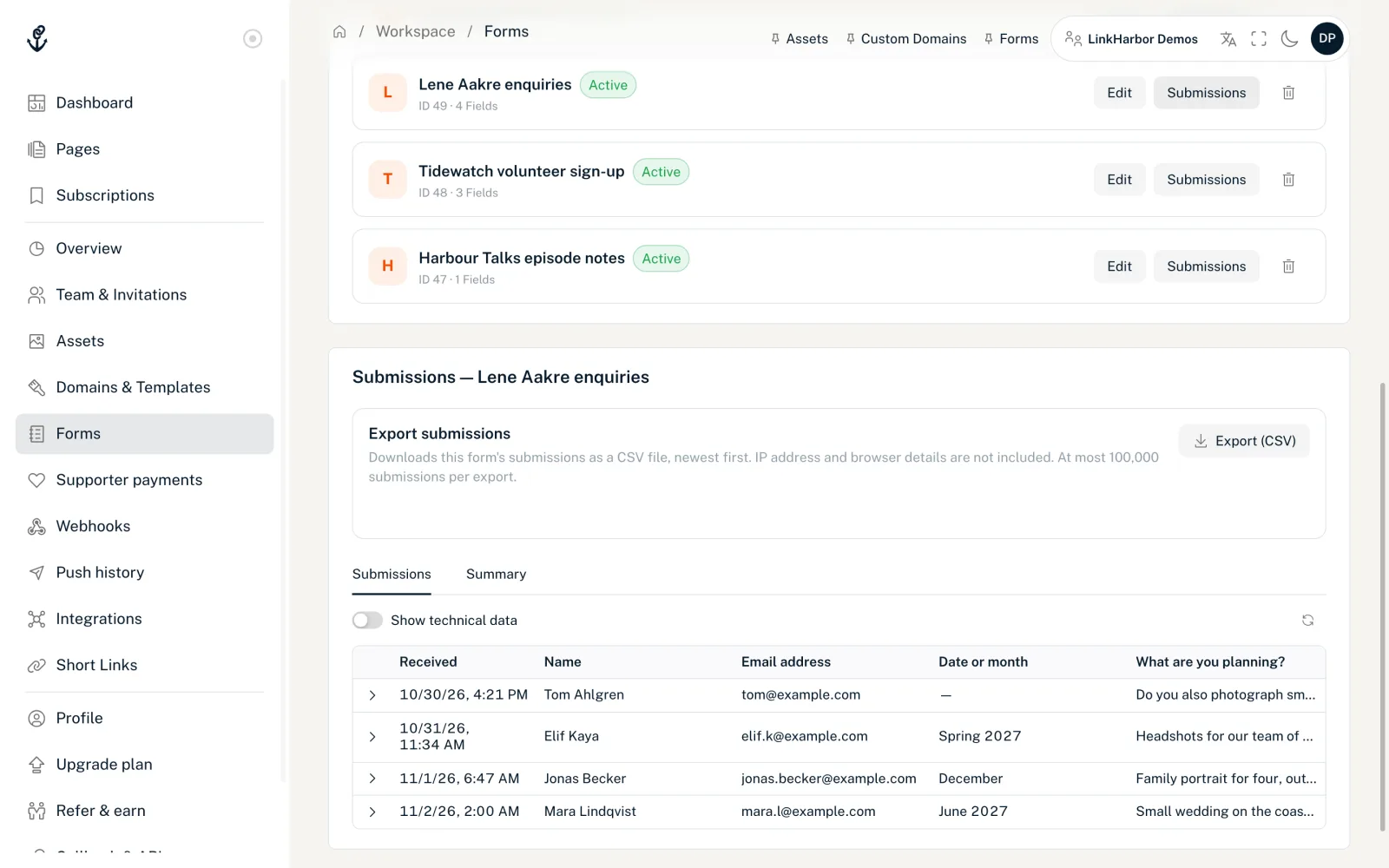
Open the submissions
- In the menu under Workspace, open “Forms”
- Click “Submissions” next to the form you want; the panel appears below the list and loads right away
The “Submissions — form name” panel shows the submissions as a table, 20 per page: “Received” first, then one column per field with its label. Checkboxes appear as “Yes” or “No”. Values of fields that no longer exist are in a “Key (removed field)” column. Fields marked as confidential (sensitive) via the API appear as “confidential”; there is no separate option for this in the dashboard.
Below the table you page through all submissions, newest first. The dashboard only loads older ones when you open their page. To get all of them in one file, use “Export (CSV)”.
Technical details such as page, block, page URL, source, UTM parameters, browser details and consents are hidden. You open them per row with the arrow, or for all rows with the “Show technical data” switch. LinkHarbor only stores the IP address as a hash with a secret key, never in plain text.
Summary
The “Summary” tab shows “Total submissions”, “Last submission”, which blocks use the form, and the retention, that is whether and after how many days submissions are deleted automatically.
Plan
The panel is available from Creator Pro. On Creator Free there are no forms and therefore no submissions.
Export as CSV
At the top of the panel is the “Export submissions” area. Clicking “Export (CSV)” downloads the form's submissions as a CSV file, newest first. You can open the file in Excel, Numbers or Google Sheets.
- One column for the time, one for the page and one column each per form field and consent
- IP address and browser details are not included
- At most 5,000 submissions per export on Creator Pro, 20,000 on Creator Agency and 100,000 on Enterprise; if there are more, the file contains the newest, and “Not every submission is included: …” appears
- Fields you removed or whose key you changed are missing for older submissions in the export; their values remain in the submissions list
- From Creator Pro, for editors, admins and owners
Developers fetch the same file via the API with the “Read · Forms” scope, see API endpoints. A connected AI assistant can also read the latest submissions, see AI tools.
Notifications
LinkHarbor currently sends no e-mail and no push notification for new submissions. So check “Submissions” regularly, or have your own system fetch them via the API.
How long submissions are kept
Submissions are kept until an automatic deletion period removes them, the workspace is deleted together with its owner's account, or you delete the form. Such a period can currently only be set via the API: in the form's settings you define after how many days (1–3650) older submissions are deleted automatically. A nightly run then removes them.
curl -X PATCH https://dock.at-harbor.com/v1/forms/42 \
  -H "Authorization: Bearer $LH_TOKEN" \
  -H "Content-Type: application/json" \
  -d '{"settings":{"retention_policy":{"auto_purge":true,"retention_days":180}}}'
You get the token with an API key that has the “Write · Forms” scope, see API keys and tokens. The settings object completely replaces the form's previous settings. If you have already set other values there via the API, send them along in the same call.
If someone asks you what data you hold about them, or wants it deleted, see Access and erasure requests from visitors. You currently can't delete individual submissions in the dashboard.
When the form is deleted
A deleted form disappears from the list and no longer accepts submissions. LinkHarbor deletes all its submissions along with it, permanently; none of them can be restored. So save submissions you want to keep with “Export (CSV)” first.
After a downgrade to Creator Free, forms are deactivated, not deleted.
You might also find this useful
Nothing found?
Tell us what you need, and our support team will help you personally.