












































Contact, opening hours, business card, coupon and form: every field, display option and limit of the business blocks.
These blocks turn your page into a business card for shops, practices, cafés and freelancers. All business blocks are available from Creator Pro. Clicks on phone, e-mail, directions, website, coupon links and vCard downloads appear in your page statistics under “Blocks & widgets”.
Contact
Shows your contact details as tappable entries.
- “Name / business”
- Up to 120 characters. Pre-filled with the page's title.
- “Address”
- Tapping the address opens the visitor's maps app.
- “Phone”
- Visitors can call the number directly.
- “Email”
- Opens the visitor's e-mail app.
- “Website”
- An http(s) address.
- “WhatsApp”
- Your WhatsApp number.
You have to fill in at least one contact detail, otherwise you see “Fill in at least one contact detail”.
| Layout | Display options |
|---|---|
| All layouts | “Address opens maps”, “Text color” |
| Simple | No others |
| Middle | “Button color”, “Button text color” |
| Maximal | “Button color”, “Button text color”, “Card background” |
Opening hours
Shows your weekly hours and, if you like, whether you are open right now. New blocks start with Monday to Saturday 09:00–18:00, Sunday closed.
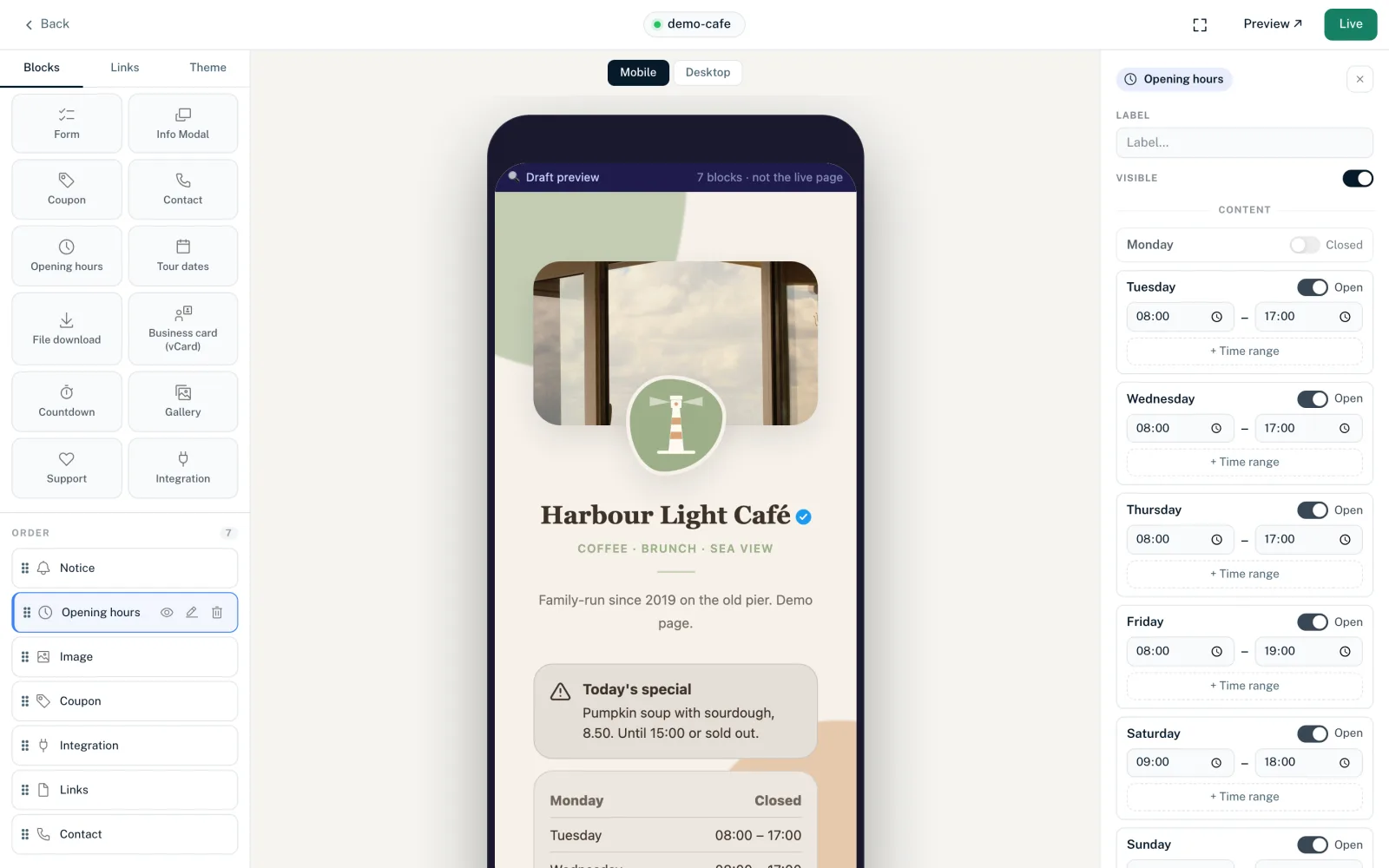
Weekly hours
- Every day from Monday to Sunday has an “Open” / “Closed” switch
- Up to 3 time ranges per day, for example for a lunch break. Add more with “+ Time range”
- “Copy Monday to Tue–Fri” copies Monday's hours to Tuesday through Friday
- Times in HH:MM format. The end must be after the start, and time ranges must not overlap
Special hours
Under “Special hours (holidays, vacation)” you add up to 30 exceptions with “+ Exception”. Each has a date range, a label (e.g. “Christmas”, up to 80 characters) and either closed or its own hours. A new exception needs a date first; until then the builder does not save the block. Open exceptions get one time range.
- “Timezone”
- Your business's time zone. Whether you are open right now is based on it, even if visitors are in another time zone.
- “Note below the hours”
- Optional text below the table, up to 500 characters, e.g. “Appointments by arrangement”.
| Layout | Display options |
|---|---|
| All layouts | “Time format” (Automatic, 24h, 12h), “Show open / closed status”, “Highlight today”, “Text color” |
| Simple | No others |
| Middle | “Date format” (Automatic, DD.MM.YYYY, DD/MM/YYYY, MM/DD/YYYY, YYYY-MM-DD) |
| Maximal | “Date format”, “Card background” |
Business card (vCard)
A button that lets visitors add your contact details straight to their address book as a .vcf file. The file is generated from the fields on every download, so you don't need to upload anything. New blocks start with “Jane Doe”.
- “First name”, “Last name”, “Company”
- At least one of them is required.
- More fields
- Optional: “Job title”, “Phone”, “Mobile”, “Email”, “Website”, “Street and number”, “Postal code”, “City”, “Country”, “Note”.
- “Button text”
- The button's label; if left empty, “Save contact”.
| Layout | Display options |
|---|---|
| All layouts | “Text color”, “Button color”, “Button text color” |
| Maximal | Also “Card background” |
Coupon
Shows a discount code that visitors copy with one click. New blocks start with the code “WELCOME10” and “10% off your first order”.
- “Coupon code”
- Required, up to 40 characters. Letters, numbers, spaces and - _ . # % ! & + are allowed.
- “Description”
- Optional, up to 200 characters.
- “Link”
- Optional. Shown as a button, e.g. to your shop, and counted in the statistics.
- “Button text”
- Label of the link button, up to 60 characters, e.g. “Go to shop”.
- “Valid until” and “Timezone”
- Optional expiry date.
- “Terms”
- Optional small print, up to 500 characters.
| Layout | Display options |
|---|---|
| All layouts | “Date format”, “Time format”, “Show expiry date”, “After expiry” (Show or Hide), “Accent color” |
| Simple | No others |
| Middle | “Button color”, “Button text color” |
| Maximal | “Button color”, “Button text color”, “Card background” |
Form
Embeds a form from your workspace, such as a contact or sign-up form. You create the form itself first under Workspace → “Forms”, see Create a form. If there is none yet, the block can't be added.
- “Form”
- The “Select form…” dropdown with all forms in the workspace. New blocks are called “Contact form”.
| Layout | Display options |
|---|---|
| All layouts | “Button text” (up to 60 characters; if left empty, the form's submit text, otherwise “Send”), “Button color”, “Button text color” |
| Simple | No others |
| Middle | “Heading”, “Text color” |
| Maximal | “Heading”, “Description”, “Text color”, “Card background”, “Corner radius” 0–24 px (14) |
How many forms you can create depends on your plan: 5 on Creator Pro, 25 on Creator Agency. More on embedding and submissions in Add a form to your page.
You might also find this useful
Nothing found?
Tell us what you need, and our support team will help you personally.